Multi-Carrier Shipping Software: The Complete Guide
September 08, 2026 10 min read

Your small-scale business is finally thriving after lots of ups and downs, but if you are still routing every order through a single carrier's dashboard, you're not running a proper shipping operation — you're one step away from a major slowdown. Multi-carrier shipping software exists because no single carrier is the cheapest, fastest, or most reliable option for every zone, every package weight, and every delivery window. We've curated this guide to break down what the category actually does, where single-carrier setups quietly bleed margin, what separates enterprise-grade platforms from glorified label printers, and how to roll out a multi-carrier strategy on your own floor without breaking anything on day one.
What is Multi-Carrier Shipping Software?
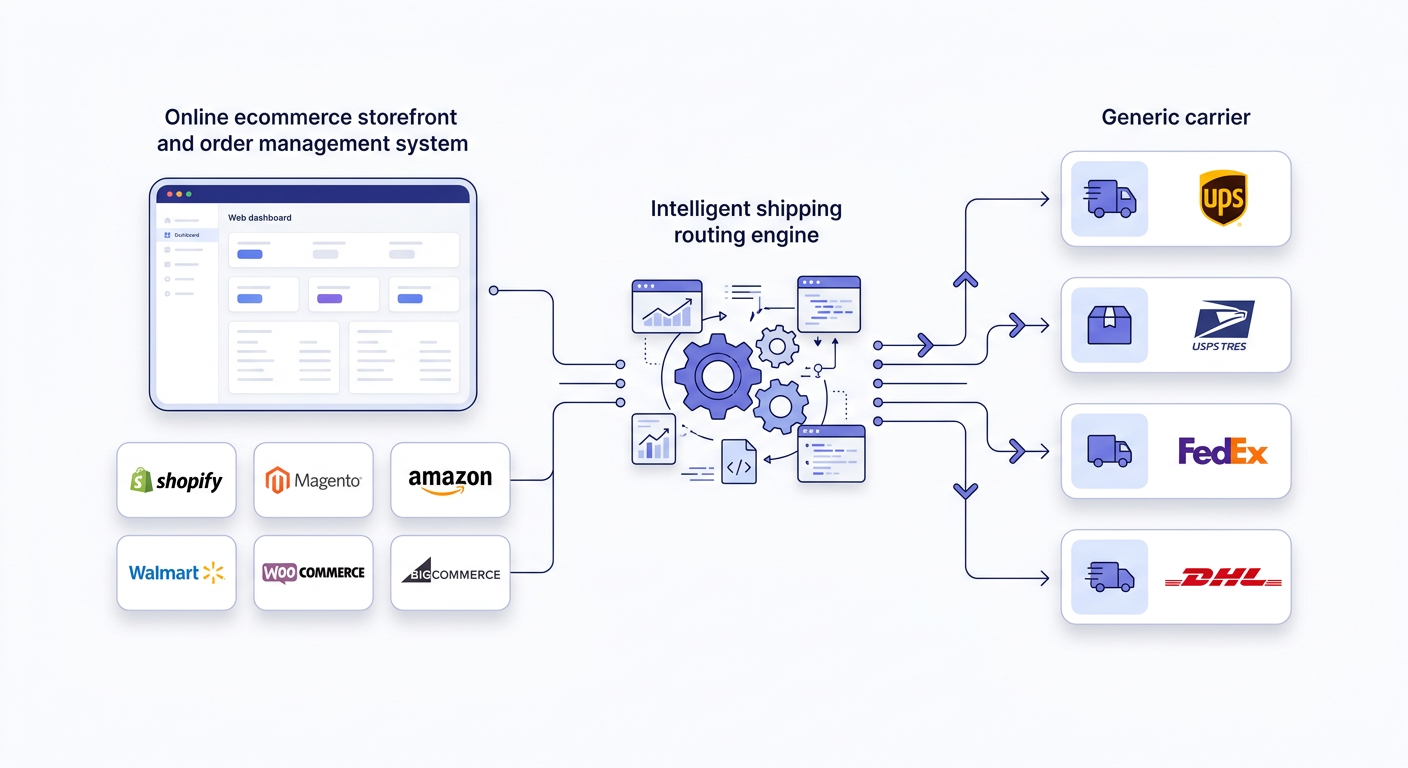
Multi-carrier shipping software is the middleware that connects your order management system (OMS) or ERP and the carrier networks you ship through — USPS, UPS, FedEx, DHL, OnTrac, and regional players. It pulls orders in from wherever they originate, checks live rates and transit estimates across every connected carrier account, applies your business logic to pick a service, generates the label, and pushes tracking data back out to the sales channel and the customer.
That's the technical definition. The operational reality is simpler: it's the system that decides, order by order, "who ships this, and how," without a human opening five different carrier portals to figure it out.
The Operational Layer, Not Just a Label Printer
A lot of teams confuse "shipping software" with "label printers." That's a mistake that costs money. A label printer takes an address and a weight and spits out a barcode. An operational layer does that plus:
- Rate shopping across every account you've connected, in real time, at the point of batch processing
- Applying routing rules based on weight, dimension, destination zone, service level, and SLA commitments
- Reconciling order data from multiple sales channels into one fulfillment queue
- Managing exceptions — address corrections, oversized packages, split shipments — without stalling the batch
- Feeding tracking numbers and delivery confirmations back into your OMS, your storefront, and your customer service tools
If your current tool can't do all five of those, you have a label printer with a carrier account attached, not a shipping system.
Single-Carrier Dependency vs. Multi-Carrier Flexibility
Single-carrier dependency happens gradually. A brand starts on Shopify, connects USPS because it's the default, and six months later 90%+ of volume still moves through one network — not because it's the best option, but because nobody built the alternative.
The problem isn't that USPS, UPS, or FedEx are bad. It's that locking into one network removes your ability to respond to three things that change constantly: cost (rates and surcharges shift by carrier and season), service quality (on-time performance varies by zone and time of year), and risk (a single network outage or service disruption stops 100% of your shipments instead of a fraction).
Multi-carrier flexibility means every order gets evaluated against the carriers you've negotiated rates with, and the system — not a warehouse associate guessing — picks up the best fit. That's rate optimization. It's also risk mitigation: if one carrier network degrades during peak, you're not fully exposed.
Criteria | Single-Carrier Setup | Multi-Carrier Setup |
Rate exposure | Locked to one carrier's rate card and surcharge schedule | Rates compared live across all connected accounts |
Peak season risk | 100% of volume exposed to one network's capacity limits | Volume can shift to carriers with available capacity |
Zone performance | Fixed transit times regardless of lane efficiency | Routing can favor the carrier strongest in a given zone |
Negotiating leverage | Limited — carrier knows it's your only option | Stronger — volume can be redistributed if terms don't hold |
Failure mode | Outage or strike halts fulfillment entirely | Other carriers absorb volume during disruption |
The Hidden Costs of Single-Carrier Dependency
Most teams don't feel single-carrier dependency as one big expense. It shows up as a dozen small ones, scattered across invoices most people don't read line by line.
Carrier Surcharges Stack Quietly
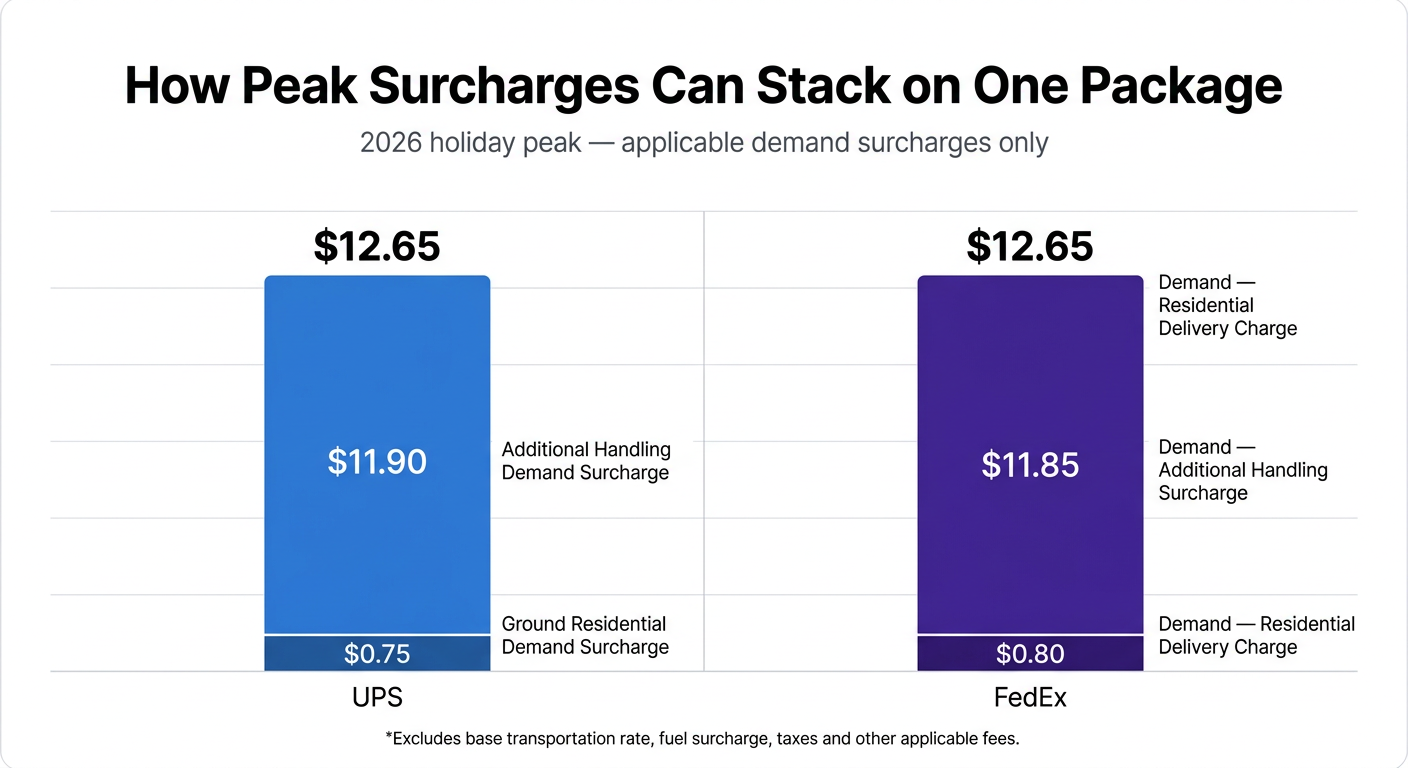
Every major carrier runs a surcharge schedule layered on top of base rates: fuel surcharges, residential delivery surcharges, delivery area surcharges (DAS and extended DAS), additional handling for irregular dims, oversize charges, and address correction fees. None of this show up on the quoted base rate. They show up on the invoice 30 days later, and by then the shipment's long gone.
The dollar amounts aren't trivial. For the 2026 peak window, published carrier rate cards put Ground Residential demand surcharges in the $0.50–$0.80 per-package range, with Additional Handling running $8.80–$11.85 per package and Oversize surcharges exceeding $117 per package in some cases. None of that is a one-time hit — it's per package, every package, for roughly twelve weeks straight from late September through mid-January.
Dim weight is the one that catches the most operations off guard. Carriers bill on whichever is greater — actual weight or dimensional weight (length x width x height ÷ a carrier-set divisor). A light, bulky box can bill significantly heavier than its scale weight. If you're not comparing dim weight pricing across carriers before you ship, you're absorbing a cost you didn't need to.
Peak Season Rate Hikes
Peak season surcharges aren't a rumor — they're published, annual, and they compound with every other surcharge already on the account. A carrier that's your cheapest option in July can be your most expensive option in December once peak surcharges layer onto residential and DAS fees. If that carrier is your only option, you eat the increase. If it's one of several, you route around it.
Delivery Zone Penalties & Operational Risk
Carriers price by zone — the distance band between the origin and the destination ZIP. Zone skipping is a lever multi-carrier setups use to cut zone-based cost. A single-carrier operation shipping nationally from one warehouse has no way to exploit that; every order pays full zone pricing regardless of volume concentration in a given region.
Core Features of Enterprise-Grade Multi-Carrier Systems
Not all "multi-carrier" software is built the same. A lot of tools connect multiple carrier accounts but still require manual rate comparison, manual batch selection, and manual exception handling — which defeats the purpose. Here's what actually distinguishes an enterprise-grade system.
Real-Time Rate Shopping and Dynamic Carrier Routing
This is API rate shopping: at the moment of label creation, the system queries every connected carrier account for a live rate on that specific package — weight, dims, origin, destination, service level — and either presents the options or auto-selects based on your rules. The difference between real-time rate shopping and a static rate table is the difference between an accurate margin and a guessed margin. Rate tables go stale the day a carrier updates its schedule; live API calls don't.
Dynamic routing takes it a step further by applying conditional logic automatically: if destination zone > 5 and weight < 2 lbs, route to Carrier A; if weight ≥ 20 lbs, route to Carrier B regardless of zone. No manual selection is required.
Automated Batch Order Processing & Auto-Cart Rules
Warehouse throughput lives or dies on batch processing. A system that makes you open each order individually to pick up a carrier and confirm a rate doesn't scale past a few dozen orders a day. Enterprise systems let you:
- Pull hundreds of orders into a single batch
- Apply auto-cart rules that pre-sort orders by weight, SKU, destination, or customer tag before batch label generation
- Generate labels for the entire batch in one action, with exceptions flagged separately instead of stalling the whole run
This is the mechanism that turns a pick-pack-ship workflow from a per-order task into a per-wave task.
Multi-Channel Order Synchronization
If you sell on Shopify, Amazon, WooCommerce, and Magento simultaneously, your shipping software needs to pull orders from all four into one fulfillment queue — not four separate queues that someone has to check individually. Synchronization needs to be two-way: orders come in, and once a label is generated, tracking and fulfillment status need to push back to the originating channel automatically, including Amazon's Buy Shipping compliance requirements where applicable.
Gaps here are where inventory oversells happen — if channel sync lags, a SKU can show as available on two storefronts after it's already been allocated on a third.
Label Creation Efficiency & Custom Packing Slip Workflows
Label creation speed at the individual order level matters less than most people think — batch speed is what matters. But packing slip customization matters more than most people think. Custom packing slips (branded, itemized, with return instructions, gift messaging, or compliance documentation for B2B) are generated at the same step as the label, not as a separate process, in a system built for this. That single-pass generation is what keeps a pick-pack-ship line moving without a second workstation just for paperwork.
Exception Handling and Address Validation
Batch speed only matters if exceptions don't stall the whole run. Enterprise systems validate addresses against carrier-standard databases before a label is generated, catching bad ZIP-to-city matches, missing unit numbers, and undeliverable addresses at the batch step instead of after the package is already in transit and getting returned. When an exception does occur — an address fails validation, a package exceeds a carrier's max dimensions, a weight doesn't match the SKU's expected profile — the system needs to pull that single order out of the batch and flag it for manual review without pausing label generation for every other order behind it. A tool that halts the entire batch on one bad address isn't built for volume; it's built for a handful of orders a day.
Multi-Carrier Software vs. Native Platform Shipping
Every e-commerce platform now has some version of built-in shipping — Shopify Shipping, Amazon Buy Shipping. They're not built for volume beyond a certain point, and they're not built for multi-box, multi-channel operations at all.
Criteria | Native Platform Shipping | Traditional Desktop Tools | Modern Multi-Carrier |
Rate Discounts | Platform-negotiated only | Carrier-specific, manual logins | Own negotiated + live rate shop |
Batch Speed | Slows past few dozen orders | Desktop-bound, no cloud sync | Built for high-volume batch runs |
Multi-channel Sync | Limited to native channel | Single channel or manual CSV | Native sync (Shopify, Amazon, etc.) |
Carrier Flexibility | Locked to platform relationships | Manual entry per shipment | BYO Accounts + automated routing |
How to Implement a Multi-Carrier Strategy
Switching from single carrier to multi-carrier isn't a weekend project if you want it done without disrupting live fulfillment. Four steps, in order:
- Step 1: Order Volume Audit — Pull 60–90 days of order history and break down dim weight impact and zone concentration.
- Step 2: Mapping Shipping Rules — Translate findings into strict conditional logic (e.g.,
IF weight > 20 lbs → Route to Carrier B). - Step 3: Integrating Channels — Connect store feeds sequentially to protect real-time inventory deduction.
- Step 4: Floor Team Training — Run parallel batch runs in staging to prepare team leads for exception handling.
How ShipKasa Solves Key Fulfillment Bottlenecks
Adding more carriers can give a business more shipping options, but it can also create more work if every carrier, sales channel, and order has to be managed separately. That is where a multi-carrier shipping platform like ShipKasa can make a difference.
One place to manage orders from multiple sales channels. ShipKasa brings orders from platforms such as Shopify, Amazon, WooCommerce, Walmart, BigCommerce, Magento, and Target into a centralized shipping workflow. Instead of switching between different storefronts and carrier websites, fulfillment teams can manage orders, shipping, and tracking from one platform.
Compare shipping rates before you print the label. Different carriers can offer better rates depending on the destination, package, and service level. ShipKasa lets businesses compare available carrier rates and choose the shipping option that makes the most sense for each order, helping reduce the manual work involved in checking carriers one by one.
Batch shipping for high-volume fulfillment. When order volume grows, processing shipments individually quickly becomes a bottleneck. ShipKasa supports batch processing and bulk label creation, allowing teams to work through groups of orders instead of repeating the same steps for every package. Automation rules can also help apply shipping decisions consistently as order volume increases.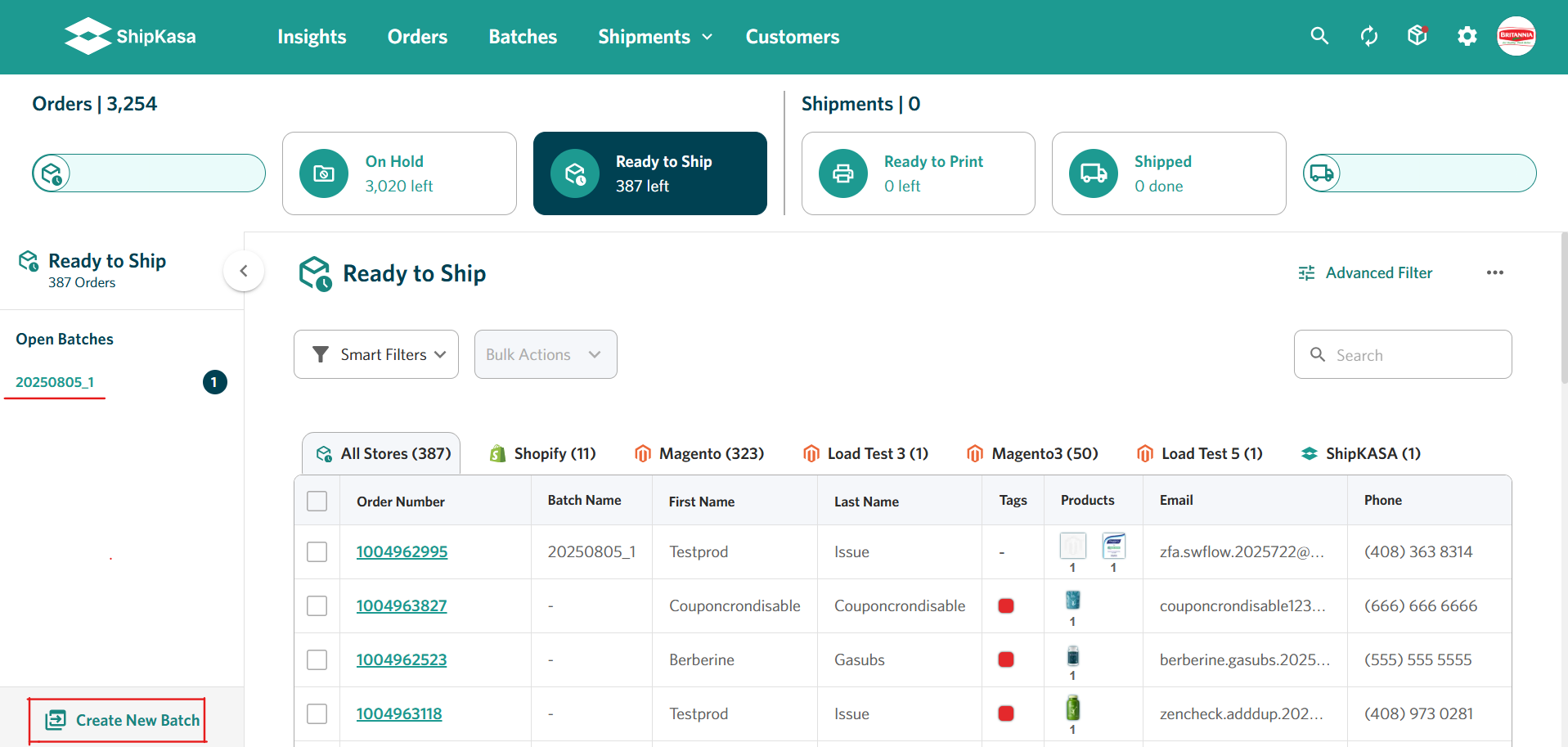
Multiple carriers without multiple workflows. ShipKasa connects with major carriers including USPS, UPS, FedEx, DHL, and OnTrac. This gives businesses the flexibility to use different carriers while keeping shipping operations in a single workflow rather than managing separate carrier portals throughout the day.
Keep fulfillment and tracking connected. Once orders are processed and labels are created, ShipKasa keeps shipment information connected to the order workflow. Tracking information can be synchronized back to supported sales channels, giving businesses a more consistent way to manage shipments after the package leaves the warehouse.