How to Choose the Best Multi-Carrier Shipping Software for Your Business?
October 14, 2026 18 min read

Last verified: October 2026. Carrier rules and surcharges change often, so dates are noted where they matter. Dollar amounts are published list prices; negotiated rates differ.
[Shipkasa is a multi-carrier shipping platform. This checklist is written to work with any vendor, including us, and we note where needs differ.]
When comparing multi-carrier shipping software, you may notice a familiar pattern: nearly every platform seems to offer rate comparison, bulk label creation, and a lineup of carrier logos. But a feature list alone doesn’t tell you much about what using the software will actually be like.
What matters is how a tool handles your orders: your package sizes, carrier accounts, store setup, and the less-than-perfect days when an address is incorrect or a shipping label fails to generate.
This checklist is built around testing, not simply ticking boxes. If you’re looking for background on what multi-carrier shipping software is and how the workflow works, our complete guide covers that. Here, we're assuming you’re already comparing tools and want a practical way to tell them apart.

The short answer
Choose based on five things, in this order:
- Your actual bottlenecks. What’s taking time or costing you money right now?
- Fit with your carriers, services, and accounts. It’s not about how many carriers a platform supports; it’s about whether the ones you need work the way you need them to.
- How it handles your real orders, including failures. A smooth demo with a perfect order doesn’t prove much.
- Total cost at today’s volume and a realistic future volume. The subscription price is only part of the picture.
- What will still be manual. Every tool leaves some work for your team.
One thing you should be cautious about: a promise of a specific savings percentage before a vendor has seen your orders. Savings depend on your package sizes, destinations, carrier agreements, and available shipping options. No one can know the number in advance.
Step 1: Write down what you need to fix
Before you open a vendor’s website, spend ten minutes answering these questions. You’ll get more out of every demo if you know what you’re trying to solve.
- Where does the time go today? Comparing rates, re-entering addresses, copying tracking numbers into your store, fixing label errors, or something else?
- Which carriers and specific services do you use—or want to use?
- Do you have carrier accounts or negotiated rates you need to keep using?
- Which sales channels send you orders: your own store, marketplaces, or both?
- How varied are your packages? A steady stream of small, similar parcels is a very different challenge from a mix of bulky, fragile, and heavy items.
- Who does the shipping? One person at a laptop, or several packers working at once?
Order volume matters, but it doesn’t tell the whole story. A seller shipping 20 bulky, complicated orders a day may need more from their software than a seller shipping 200 identical lightweight parcels.
A small store mostly needs simple setup, reliable labels, fair pricing, and the integrations it actually uses. A growing brand starts to care about bulk labels, rate comparison, and repeatable workflows across more than one sales channel. A higher-volume fulfillment team should look hardest at batch throughput, exception handling, and user permissions. If you have negotiated carrier rates, support for your existing accounts and transparent rate comparison come first. And if you sell on several channels, what matters most is that orders land in one place and tracking syncs back to the right channel. Treat these as starting points, not categories you have to fit into.
Step 2: Check the core features by testing them
Carrier coverage: fit matters more than count
Supporting 15 carriers isn’t automatically better than supporting the three you need. Check:
- Are your required carriers and the specific services you use supported?
- Can you connect your own carrier accounts, use rates available through the platform, or both? Platforms differ, and that can affect billing, rate eligibility, and sometimes your carrier contract. Ask who bills you for each label.
- Can you compare rates from your own accounts with other available options?
Also, keep in mind that more carriers don’t automatically mean more savings. Each additional carrier brings more account administration and more differences in services and exceptions. A second carrier is useful if it’s a better fit for the destinations, package sizes, or service levels you actually ship.
Rate comparison: the quote isn’t the invoice
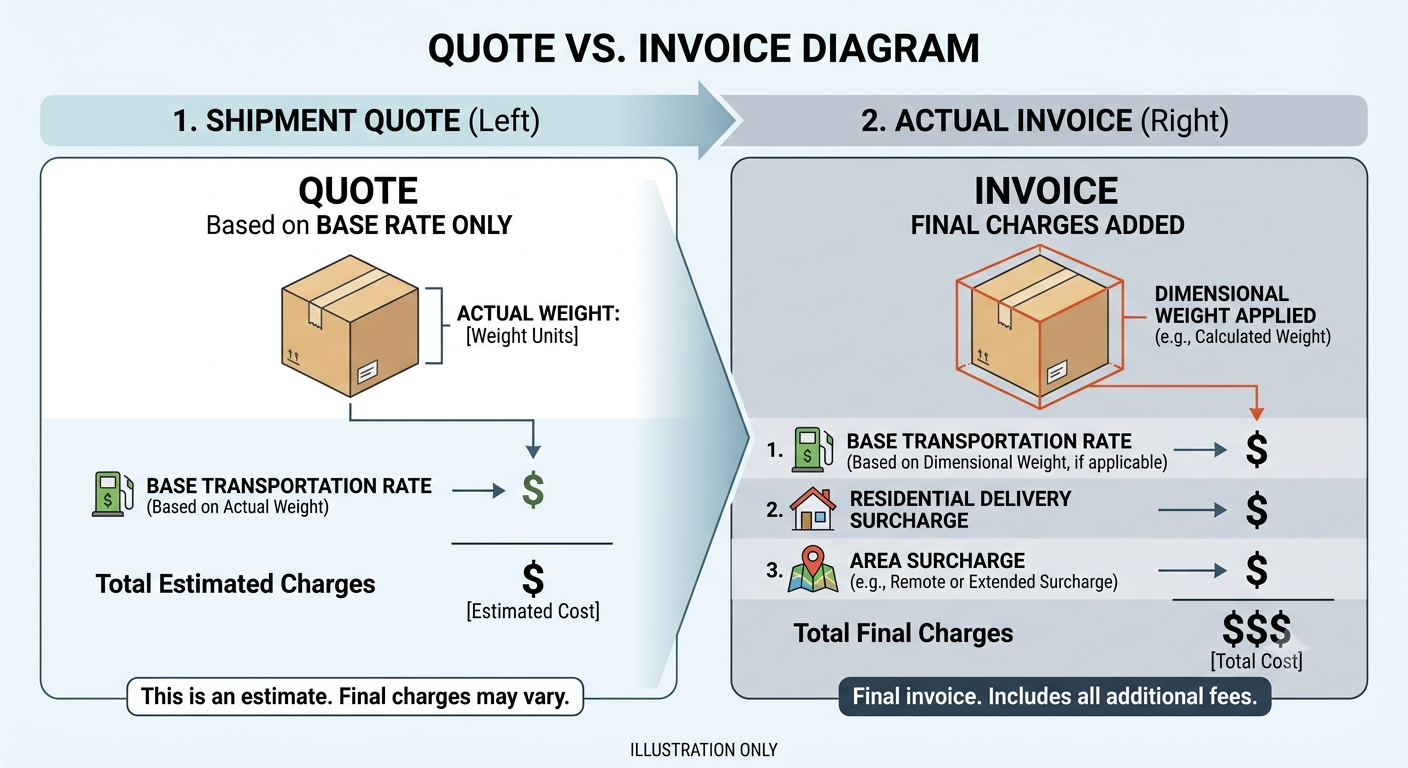
This is one area where it’s worth taking your time. The rate you see when you create a label is an estimate. The carrier’s final charge can be different for several reasons:
Factor | Why it matters |
|---|---|
Base rate | The starting charge for the weight, zone, and service |
Dimensional weight | A large, lightweight box may be priced based on its size rather than its scale weight |
Residential delivery | Carriers may charge more for deliveries to residential addresses |
Delivery-area surcharges | Some ZIP codes cost more to serve |
Accessorial charges | Extra charges for things like address corrections or additional handling |
Here’s a concrete example to show how the rule works. This is an illustration, not a real shipment. Say you’re shipping a lightweight pillow in a 12 x 12 x 14-inch box that weighs 2 lb on the scale. The box has a volume of 2,016 cubic inches. USPS applies dimensional-weight pricing to certain domestic parcels over one cubic foot, using length x width x height ÷ 139. It rounds dimensions up to the next whole inch and charges based on whichever is greater: actual weight or dimensional weight (USPS). By that calculation, the box is priced closer to 14.5 lb than 2 lb. Which services this applies to, and how other carriers calculate dimensional weight, varies. Check each carrier’s current rules (USPS parcel standards).
Residential and area surcharges work in a similar way. UPS, for example, defines residential delivery as delivery to a home—including a business run from a home—and says an additional charge applies (UPS). Its rate documentation also notes a surcharge for certain ZIP codes in the contiguous 48 states (UPS). The terms and amounts vary by carrier and can change over time.
So, what should you ask a vendor?
- Which charges are included in the price you show me, which are estimated, and which are only known after delivery?
- How do you calculate billable weight for each carrier and service?
- Can I compare the price of a lightweight, oversized box with that of a compact, heavy one?
Then run the test that matters most: put a sample of recent orders through the software and compare what it would have selected and quoted with what you actually shipped and what the carrier billed. A few dozen orders can be useful for a small store; if you ship at higher volumes, try a few hundred. Include your oddest packages.
And remember, cheapest doesn’t always mean best. A rate is no good if the service can’t ship today or won’t meet the delivery promise you made. For more background on the basics, see the pillar guide’s explanation of rate shopping.
Bulk Shipping labels: three different capabilities often get lumped together
Vendors use these terms in different ways, but they don’t all mean the same thing:
- Bulk label creation: Processing many orders into labels at once.
- Batch processing: Working through a group of orders in a shared workflow. It doesn’t necessarily mean every order is rated, selected, and printed without anyone doing anything.
- Automatic carrier selection: The software chooses the carrier and service for you, based on rules.
A tool might offer the first without the third. Ask which steps your team will still handle manually. Then test the part that’s easy to overlook: what happens if one order in a batch fails?
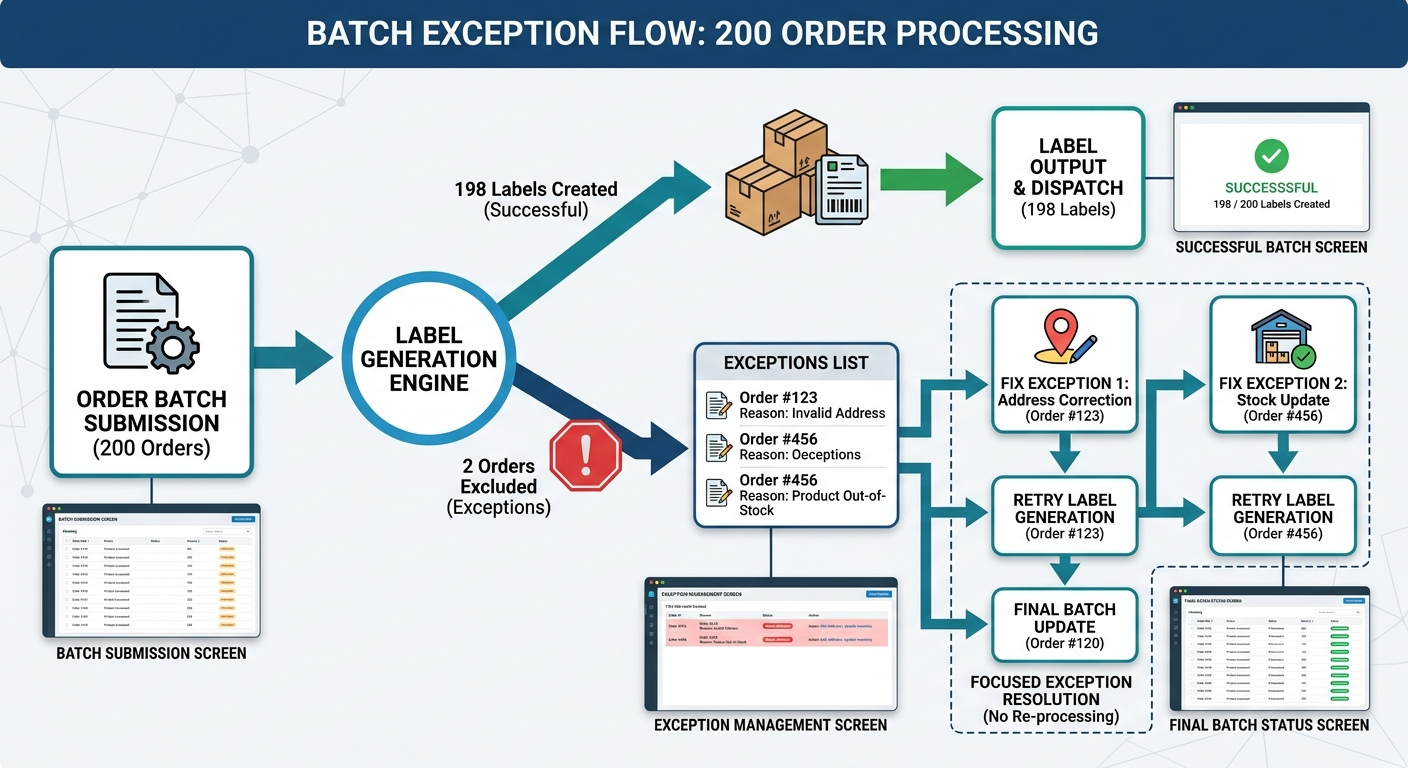
Imagine a batch of 200 orders. One has an invalid address, and another gets an error from the carrier. Can your team see which orders failed and why, fix them, and retry just those? Or does the whole batch stop? For a step-by-step look at the workflow, see our guide to printing shipping labels in bulk.
Also check the less glamorous details: thermal printer compatibility, label formats, how to reprint or void a label, and how the software catches duplicate labels.
Integrations: test the whole round trip
An integration that imports orders isn’t necessarily an integration that supports your whole workflow. Some connections bring orders in but don’t send back every fulfillment update, marketplace-specific field, or tracking detail. Check each integration separately, and try this with a test store or sample orders:
- Import orders.
- Create labels, including for one order with a problem.
- Confirm the tracking number appears on the right order in the right sales channel.
- Confirm the order’s fulfillment status updates correctly.
- Fix an error and check that the process doesn’t create a duplicate.
Ask which way the data syncs, how quickly updates arrive, and what happens when a sync fails. If you sell on marketplaces, check whether the marketplace requires particular carriers, shipping templates, or tracking rules that the software needs to follow.
The packing workflow nobody puts on the feature page
Even a good rate calculation can be wrong if the package data is wrong. Look at what happens between picking an order and printing its label:
- Can you save package sizes so packers don’t have to enter dimensions each time?
- Can one order ship in multiple packages, each with its own label and tracking number?
- How do split orders and partial shipments appear in your sales channel?
- Does the tool use the actual packed dimensions, or only the estimates saved with each product?
- Can packers scan items to reduce the risk of shipping the wrong product?
Bad product data is a quiet cause of shipping problems. Here’s a hypothetical: if a product is listed as 1 lb but actually ships in an 8 lb carton measuring 15 x 15 x 15 inches, the software may choose a lightweight service, and the final bill won’t match the quote. Good software should flag missing or suspicious data instead of silently rating the order.
Voids, refunds, and who gets billed
The price on the label, the amount you’re charged up front, and the final carrier charge can all be different. Ask how to void a label; whether refunds for unused labels happen automatically or need to be requested; whether labels are billed through the software provider or your carrier account; and how postage balances and duplicate labels are handled.
Step 3: Treat advanced features as questions, not requirements
Some capabilities are essential for certain businesses and irrelevant to others. Many platforms don’t offer all of them, and a small store shouldn’t pay for complexity it won’t use. Here’s when each capability may matter.
Ask about these only if they match your business:
- Volume commitments: If your carrier agreement has volume or spend tiers, can routing rules protect them? What happens when protecting a tier costs more on a given shipment?
- Invoice reconciliation: Can it match invoice charges to shipments, flag differences, and export the data? Does anything feed back into future carrier selection, or is that manual?
- Carrier connection failures: Is fallback automatic, manual, or unavailable? What do staff see when labels can’t be created?
- Regulated items: Can product attributes block services that can’t carry the item?
- High-value orders: Can an order over a set value require a specific service or signature?
- Multiple ship-from locations, returns, freight (LTL/FTL): Are they supported, or is the tool parcel-only?
Two points worth keeping in mind. First, invoice reconciliation, reporting, and software that automatically changes its routing based on invoice data are three separate capabilities. Don’t treat one as a substitute for the others.
Second, regulated items are a good example of why rules matter. USPS says lithium-ion batteries rated at 100 Wh or less may be mailed domestically in limited quantities when prepared according to its requirements. Larger batteries, such as those used for e-bikes, are prohibited (USPS Inspection Service). A tool that lets a packer select a prohibited service creates a risk rather than solving a problem.
Two boundaries to check
Post-purchase shipping vs. checkout. Some products handle what happens after a customer places an order: importing it, selecting a rate, creating a label, and sending tracking. Others handle what a customer sees at checkout, such as live shipping quotes and delivery estimates. These may be separate products or add-ons. Ask whether checkout features are included, licensed separately, or require another integration.
Shipping software vs. a WMS. A shipping platform creates labels and sends tracking information. That doesn’t mean it manages inventory, directs picking, or runs your warehouse. If you already have a warehouse management system, ask how the two connect. If you don’t, don’t assume shipping software covers those jobs.
Step 4: Compare the real cost using the same assumptions
A monthly subscription is only one part of the cost of shipping software. Platforms use different pricing models, so don’t assume they’re structured the same way. Check each vendor’s current pricing page and put these items on one sheet:
- Subscription price for your expected volume and plan limits, including shipments, users, stores, and carriers
- Features you need that are only available on a higher plan or cost extra
- How carrier charges are billed and whether there are additional fees
- Onboarding and support, including what’s included and what costs extra
- Extra users, if more than one person will ship
- Staff time before and after setup, estimated honestly
Run the comparison twice for every vendor: once at today’s volume and once at a realistic busy-period volume, such as peak season. One tool may look cheaper today but look different as your volume grows. Use the same assumptions for every vendor, or the comparison won’t be useful.
Step 5: Think about growth and switching
Growth. Claims like “scales to any volume” aren’t evidence on their own. Ask for stated limits, and test the workload you expect to handle during a busy period: several packers at once, your largest batch, and your busiest day. Check batch limits, user permissions—your warehouse packer and finance person may not need access to the same things—an audit trail for shipping-rule changes, and how you’d export your shipment history if you leave.
Switching. A good demo doesn’t prove you can switch without disruption. Before changing over, run a short acceptance test: import orders, create labels, confirm fulfillment updates and tracking sync, and test a few deliberate exceptions. If possible, run the old and new processes side by side briefly, and keep a way to roll back. Make a plan for staff training too.
Finally, decide who owns the setup once the software is live. Carriers change rates and surcharges, so someone needs to keep the rules and rate assumptions up to date. That work doesn’t go away when you buy software; automation depends on rules and data that still need looking after.
Step 6: Run a demo that tries to break things
Vendors naturally show the smoothest version of a workflow. Ask them to show these scenarios instead. They’re hypothetical examples for your own testing.
Ask the vendor to show you:
- A light but bulky product: how billable weight is calculated and which charges are in the displayed price.
- 300 orders before a pickup, with one invalid address and one carrier error: what happens to the other orders, how failures show up, and whether you can retry only those.
- A service whose pickup cutoff is earlier than your label time: whether the software accounts for your real schedule or leaves it to you.
- One order end to end: import, label, tracking, fulfillment update, and an error recovered.
- An order that ships in two boxes: separate labels and tracking, shown correctly in the sales channel.
- A label created twice by mistake: how to spot it, void it, and what the billing consequence is.
- A packer overriding a rule: whether the reason is recorded and a manager can review it.
- Pricing: cost at today’s volume and at your projected peak, in writing.
Step 7: Score your shortlist
Once you have two or three finalists, put numbers to the comparison so the decision isn’t just based on how you felt after the last demo. Rate each criterion from 1 (poor) to 5 (excellent), then multiply the score by its weight.
Change the weights to fit your business. For example, a store with one carrier account might give carrier coverage less weight and ease of use more.
Criterion | Weight | Score (1–5) | Weighted score |
|---|---|---|---|
Required carrier support | 5 | ||
Rate comparison and cost visibility | 5 | ||
Bulk labels and batch processing | 5 | ||
Store and marketplace integrations | 5 | ||
Automation and exception handling | 4 | ||
Total cost at expected volume | 5 | ||
Ease of use and support | 3 | ||
Total | Maximum 160 |
This scorecard measures how well each platform fits your criteria. It isn’t an independent rating of any product. Base your scores on what you saw in testing, not what you read on a sales page.
Red flags worth investigating
These are reasons to ask more questions, not accusations. There may be a good explanation for any of them.
- “Multi-carrier” support that doesn’t include the services or accounts you need
- A “lowest rates” claim the vendor can’t demonstrate using your own shipments
- Bulk printing that still leaves you resolving every exception by hand
- An integration that imports orders but doesn’t handle the fulfillment or tracking updates you expect
- Pricing where shipment limits, carrier charges, or add-on costs are hard to find
- A demo that shows only perfect orders
Mistakes that are easy to make
- Buying for the business you might have in three years. Pay for the complexity you have today, with a clear way to grow—not every advanced feature on the list.
- Judging the software by the demo order. Bring your most complicated orders.
- Comparing sticker prices. See Step 4.
- Expecting automation to mean no work. Poorly configured rules can create more exceptions and manual overrides, not fewer.
- Treating a label as a shipped package. Creating a label, the carrier accepting the package, its first scan, and delivery are separate events. Check how the software and your process tell them apart.
Is multi-carrier shipping software worth it for a small business?
It depends less on reaching a particular order count and more on how many carriers and sales channels you manage, how varied your packages are, how much time shipping takes, and what shipping costs your business carries.
A low-volume, low-margin store may be perfectly fine with one carrier or a simple two-carrier setup. A basic label tool might be enough. But if shipping takes a meaningful number of hours each week, or your destinations and package mix make one carrier a poor fit everywhere, comparing options may be worth the effort.
Measure your own numbers before deciding. Don’t assume there will be savings.
FAQ
Which features are essential, and which are optional?
For most sellers, the essentials are rate comparison across the carriers and services you use, label creation, batch processing, order and tracking sync with your store, and shipment tracking. Protecting carrier commitments, invoice reconciliation, multi-origin routing, freight, and automated fallback depend on your operation. See Step 3.
Can I keep my existing carrier accounts?
Some platforms let you connect your own accounts, some offer rates through the platform, and some do both. Before committing, ask about rate eligibility, who bills you, and any implications for your carrier agreements.
How do I know which option is really cheapest?
Compare services using the same origin, destination, package dimensions, weight, and delivery requirements. Then check what the displayed price includes. After shipping, compare the quote with the carrier invoice.
How much does multi-carrier shipping software cost?
Costs vary by platform and plan. Carrier charges are separate from the software subscription. Use each vendor’s current pricing page and the comparison sheet in Step 4.
Will shipping software replace my WMS?
Not by default. Shipping software handles rates, labels, and tracking. A WMS manages inventory and warehouse workflows. Ask how any tool you’re considering connects to the system you already use.
How hard is it to switch?
Switching involves connecting accounts, testing orders end to end, training staff, and checking how exceptions are handled. Run an acceptance test before changing over, and keep a rollback option if you can.
Before you sign anything
Pick your top two or three options and run the same set of real orders through each one, including the awkward ones. Write down where your team needed a workaround. That will tell you more than any feature page.