Master Order Management to Streamline Your Fulfillment with ShipKasa

Simplify eCommerce fulfillment with ShipKasa. Automate order merging, kitting, splitting, and replacement rules to reduce errors, optimize workflows, lower costs, and scale warehouse operations efficiently.
Updated On: 13th May 2026
If you're running a growing e-commerce operation, you already know the feeling. Orders are flying in, your warehouse team is scrambling to match the right products to the right boxes, your carriers are changing, and somewhere in the middle of all of it, a customer gets the wrong item, or nothing at all.
ShipKasa is designed to take the complexity out of fulfilment. With Order Merging, Kitting, Splitting, Alerts, and Product Replacement Rules, your operations move from manual handling to rule-based execution. Here’s how these workflows work — and where they make the biggest impact.
1. Order Merging
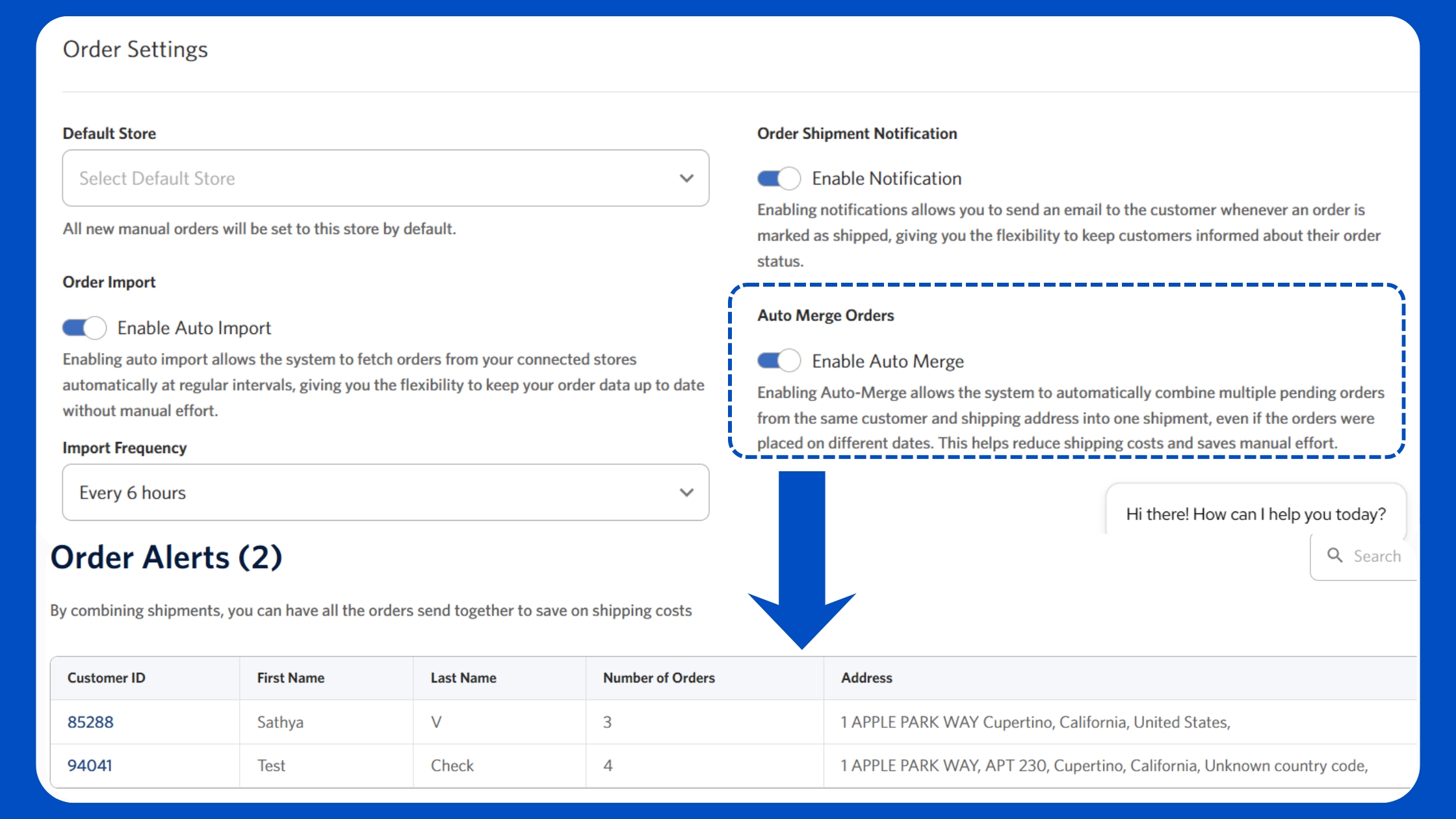
When customers place multiple orders within a short window, shipping each one separately increases carrier costs and creates unnecessary load on your packing floor. ShipKasa’s Order Merging solves this with two flexible options — enable Auto-Merge for fully automated consolidation, or you can manually review and handpick which orders to combine and merge. With auto-merge rule ShipKasa intelligently scans incoming orders and flags those with the same delivery address before they reach the packing stage, allowing your team to consolidate them into a single shipment seamlessly.
Outcome:
- Fewer parcels
- Lower shipping costs
- Cleaner packing queue
- Better customer experience (one delivery instead of multiple)
2. Order Alerts — Same Customer, Multiple Orders
A customer places an order on Monday. Then again on Tuesday. And maybe once more on Wednesday morning. Repeat orders from the same customer often go unnoticed, leading to fragmented shipments and higher costs. ShipKasa's Order Alerts identify when a customer places multiple orders within a defined timeframe.
Important to note: Alerts are triggered only for orders in a pending state (not yet shipped) — meaning these are eligible for merging. It’s a manual display of these orders, giving your team full visibility and control to decide whether to ship separately or consolidate them into a single shipment.
Outcome:
- Fewer missed consolidation opportunities
- More control over dispatch decisions
- Reduced last-mile clutter for customers
3. Order Kitting
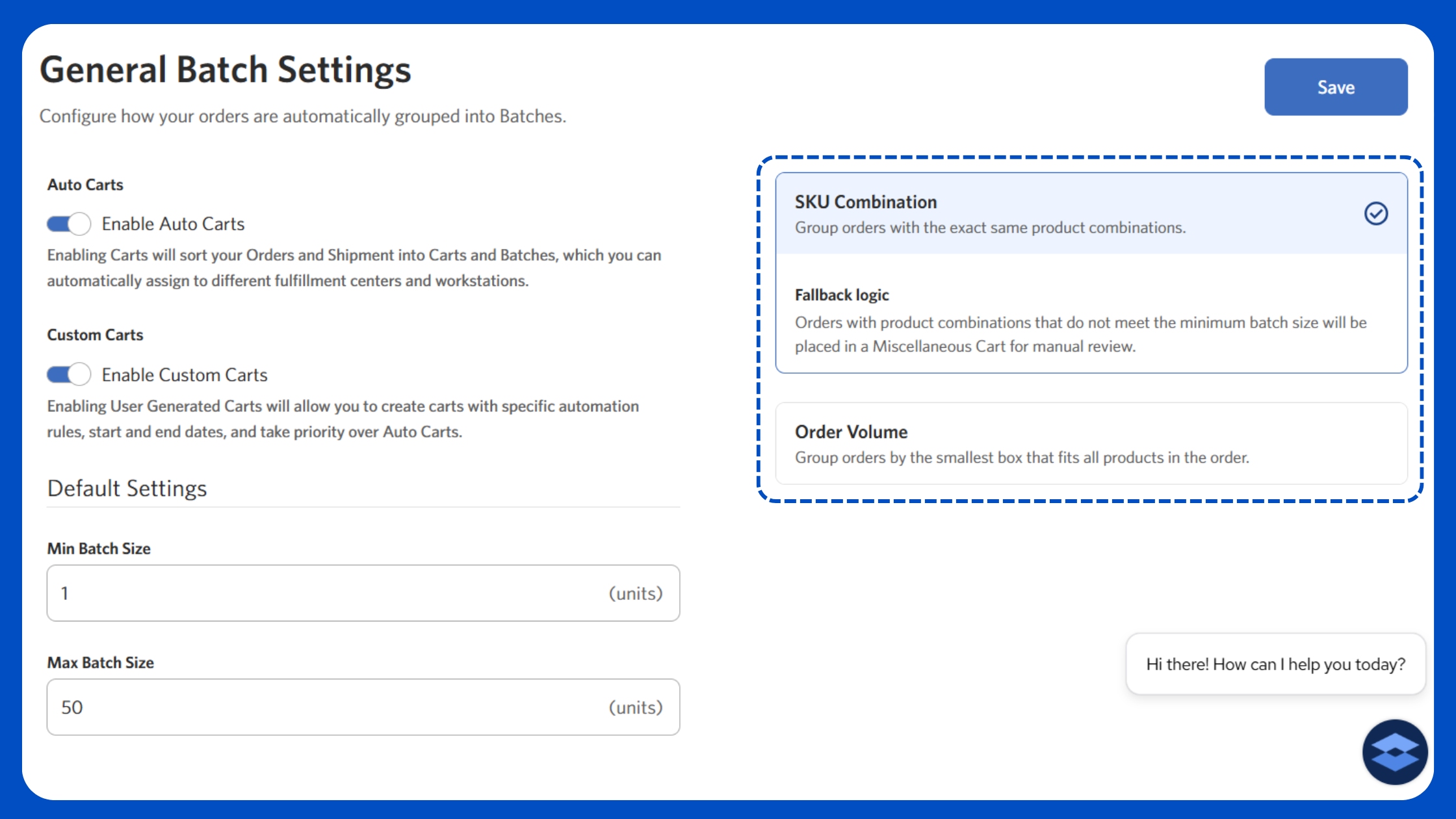
Kitting is the process of grouping orders into a logical grouping. Order Kitting in ShipKasa is rule-based and has both automated and custom options. You define the logic once and the system actions grouping, batching, and routing across all orders. Once enabled, Auto Carts automatically scans all pending orders and groups them using two core logics: SKU Combination and Order Volume. This means orders with similar SKUs are batched together for faster picking, while volume-based grouping ensures everything fits into the most efficient box size — reducing wasted space and shipping costs.
At the same time, you can set a minimum and maximum batch size, so your batches are operationally efficient. And for cases where automation needs flexibility, Custom Carts allow you to step in and create rules — whether it’s holding specific orders, prioritizing urgent ones, or keeping certain shipments separate.
Together, this setup reflects how modern fulfilment should work
Outcome:
- Faster pick-pack cycles
- Reduced errors
- Consistent bundling at scale
4. Product Replacement Rules
Here's where ShipKasa gets genuinely smart. Kitting works well when bundles need to be assembled. But when a pre-assembled version of that bundle already exists in inventory, building it again wastes time. Product Replacement Rules allow ShipKasa to automatically substitute bundled SKUs with a pre-assembled SKU.
Example:
If Product C = pre-built version of A + B → pick Product C instead of kitting
Why this matters: Pre-assembled inventory is typically faster to pick, more consistent in quality, and uses fewer warehouse resources. Product Replacement Rules ensure ShipKasa always takes the most efficient fulfilment path, prioritizing pre-built kits.
Outcome:
- Faster picking
- Lower handling time
- More efficient inventory utilization
5. Order Splitting
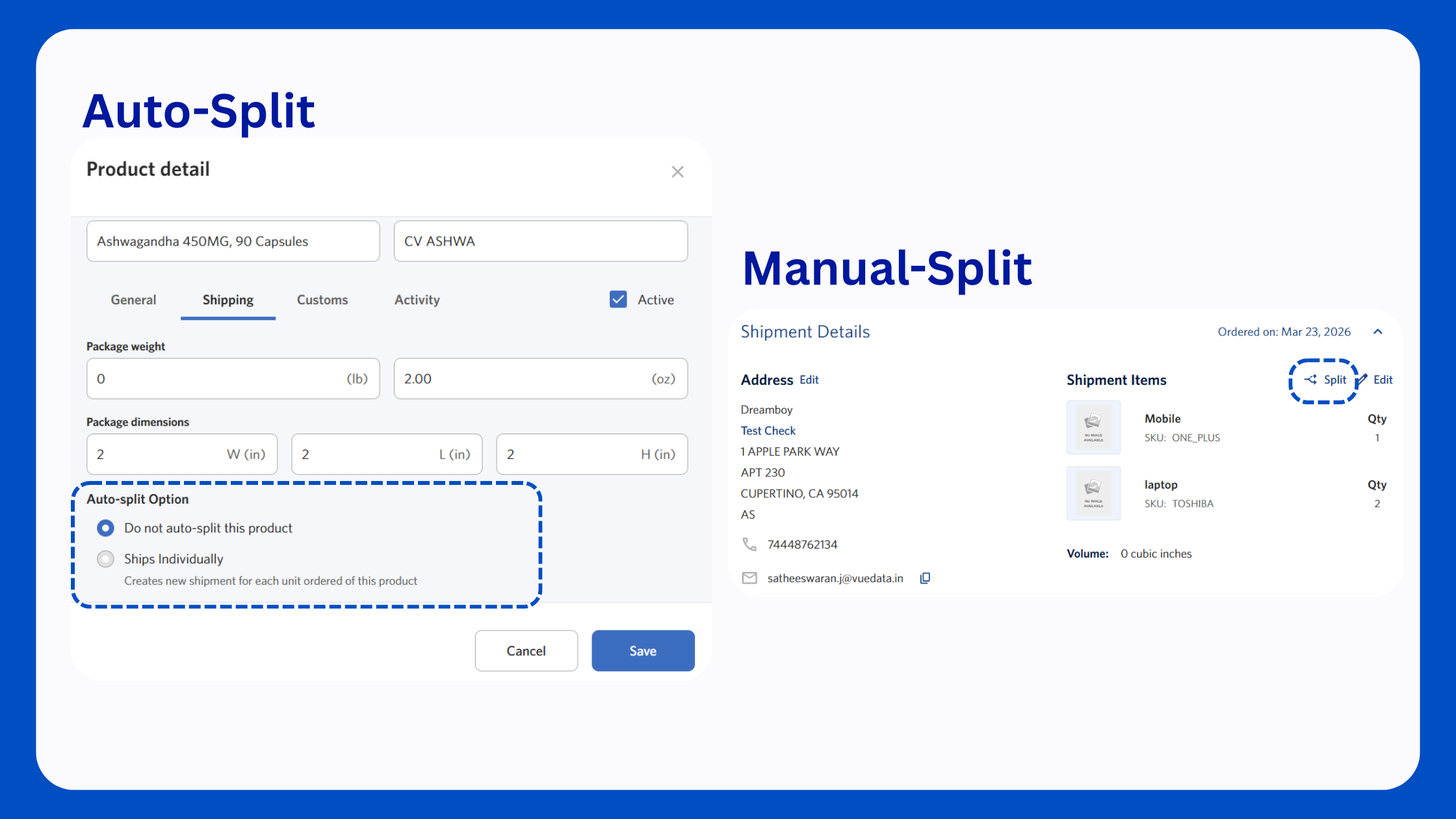
Not every order should be packed into a single shipment — especially when it contains multiple products with different sizes, quantities, or handling needs. That’s where Order Splitting comes in. ShipKasa takes a product-level approach, allowing you to define how each item should be shipped using three simple auto-split options: Do not auto-split (keep the product within the main shipment), Ships Individually (create a separate shipment for each unit), or Ship on Custom Quantity (split shipments based on a defined quantity per package). Once configured, ShipKasa applies these rules during order processing, breaking a single order into multiple shipments where required. Each shipment is then packed, processed, and tracked independently — while still being linked to the original order for complete visibility. That's not all, you also have the flexibility to manually split an order at any time.
Outcome:
- Smarter handling of multi-item and bulk orders
- Faster, more efficient packing workflows
- Independent tracking for each shipment
- No delays caused by one product holding up the entire order
Putting It All Together
ShipKasa turns multiple fulfilment decisions into a single, automated workflow. An order comes in, ShipKasa evaluates it against your rules in real time.
If a replacement is needed, it’s handled instantly. If kitting applies, it’s grouped correctly. Batch settings determine the right box, route, and fulfilment path. By the time the order reaches Ready to Print, everything is already decided — carrier assigned, shipment structured, tracking generated. From there, your team simply executes. What used to require constant coordination and real-time decision-making now runs on logic configured once and applied at scale.
Book a free demo with the ShipKasa team to experience the dashboard LIVE → https://www.shipkasa.com/book-demo